
How to Opt Out of FamilyTreeNow (2026)
Remove your FamilyTreeNow record for free with two short forms and one email link, and what to do if you're denied
Updated
FamilyTreeNow looks like a genealogy site, with census records, family trees, and old photos on the home page. But it is also a free people-search site. Search a name and state, and it lists living people with their birth month and year, age, current and past cities, and relatives. Open a record and you get the current street address with a map and the home's estimated value, phone numbers with the carrier, past addresses with dates, possible relatives and associates, property details, and sometimes an employer.
The opt-out is free and takes about five minutes, but it has two catches. It's the same system TruePeopleSearch uses, so it asks for your state of residence, and in 2025 FamilyTreeNow turned down 42% of opt-out requests, more than TruePeopleSearch did. And the buttons that look like the next step usually lead to paid background check sites. Here's how to do it right the first time.
FamilyTreeNow Opt-Out at a Glance
Opt out ofFamilyTreeNowHow we checked this guide: On November 24, 2026, we went through FamilyTreeNow's opt-out from a US connection: we searched the site, requested the email link, opened it, and reached the final opt-out form, stopping before the Submit Request button. We didn't remove anyone's record. Quotes come from the opt-out pages, the email FamilyTreeNow sent, its home page FAQ, its Notice of Right to Opt-Out, its Privacy Notice (last updated June 8, 2026), and its U.S. State Supplemental Privacy Notice (last updated July 1, 2026), which includes the 2025 request figures.
How to Remove Yourself From FamilyTreeNow, Step by Step
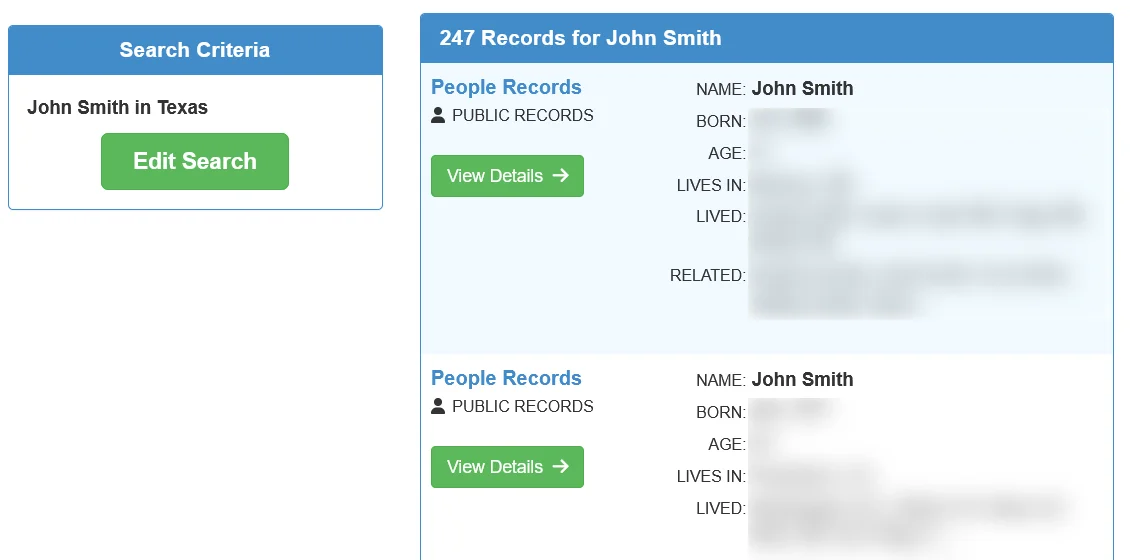
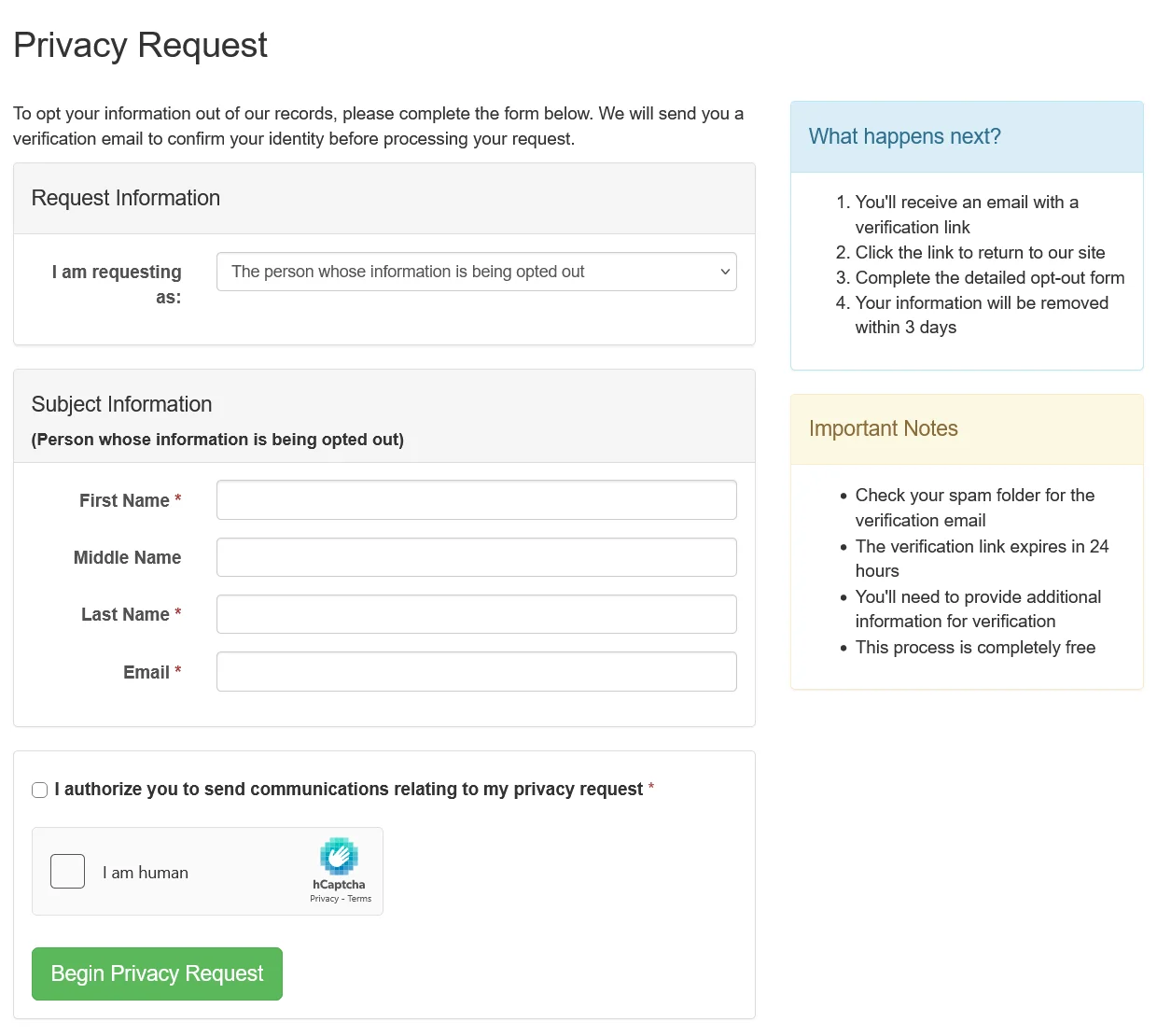
[email protected] with the subject "Complete your familytreenow.com Privacy Request," signed "familytreenow Compliance." Ours arrived within a minute; FamilyTreeNow says to check your spam folder if it hasn't come within 10 minutes. Click Click here to fill out the form. The email warns: "If you waited longer than 24 hours to click the link below, you will need to start over and generate another link."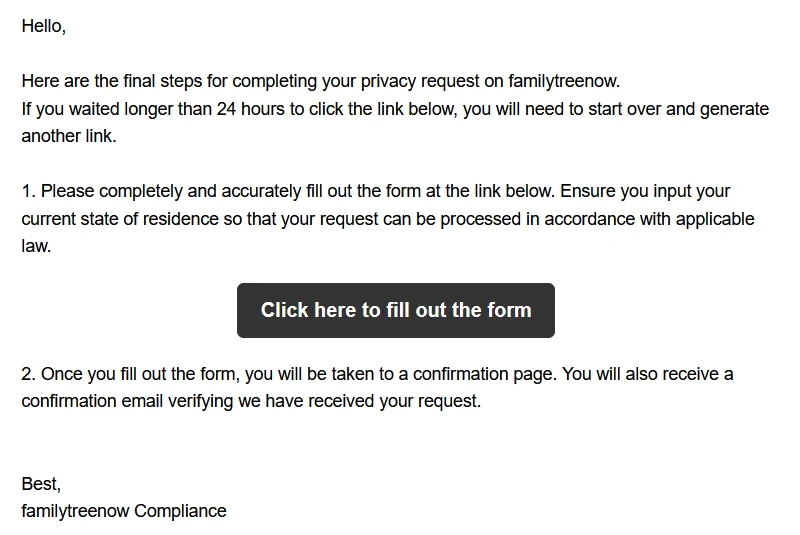
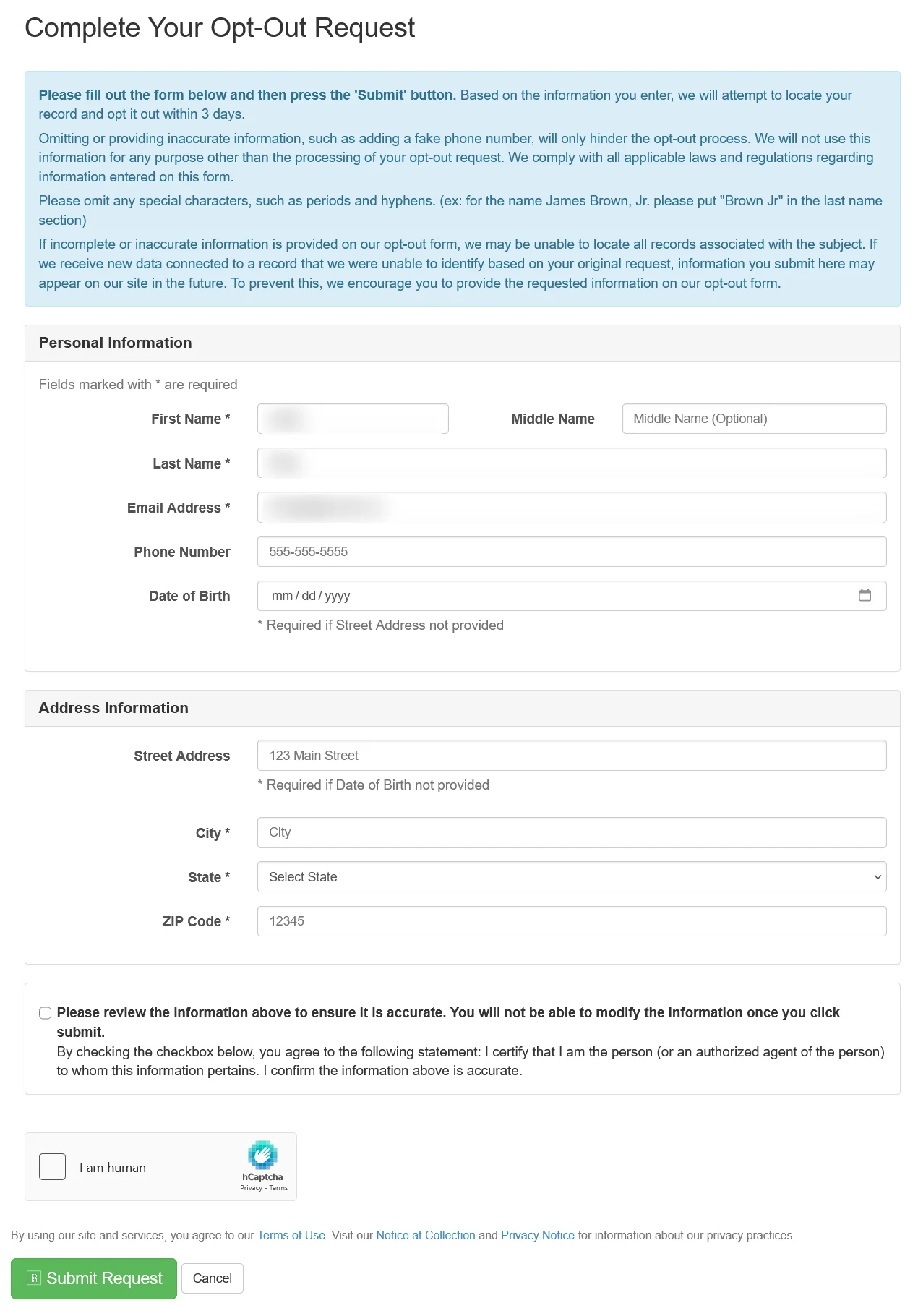
Skip the "Full Background Report" Buttons
FamilyTreeNow calls itself "100% Free Genealogy," and searching really is free. But the green buttons on every record page aren't FamilyTreeNow's:
- "View Full Background Report" and "View Criminal Records Report" are sponsored by TruthFinder, Instant Checkmate, BeenVerified, and PeopleFinders. Clicking one sent us to Instant Checkmate, which ran a fake progress bar ("Do not exit this window or go back"), flagged "Possible Criminal or Traffic Records" for a common name, and pushed us to "Select Your Result Now" and open a report.
- "Sponsored Links" under the search results lead to the same four sites.
FamilyTreeNow's privacy notice says that if you click "View Full Background Report" or "View Details," it "may redirect you to, and share your information with, our business partner." You don't need a report to opt out, and the opt-out never asks for payment. Those four sites are separate companies with their own records about you; to remove yourself from them, see our PeopleConnect guide (TruthFinder and Instant Checkmate), BeenVerified guide, and PeopleFinders guide.
FamilyTreeNow and TruePeopleSearch
If you've already opted out of TruePeopleSearch, this process looked familiar. The two sites are closely tied:
- Links everywhere. Every FamilyTreeNow page links to TruePeopleSearch.com in the footer, and record pages add "More information at TruePeopleSearch.com."
- Same opt-out system. The same two forms, the same "Compliance" email asking for your state of residence, the same 24-hour link, the same 3-day removal, and the same wording on the final form.
- Same privacy wording. Both say their data is publicly available information "not covered by U.S. state privacy laws" and that they apply opt-outs to it "as a courtesy."
FamilyTreeNow.com is run by Family Tree Now, LLC, and it publishes its own request figures, different from TruePeopleSearch's. What matters for you: each site has its own opt-out page, and neither says a request on one covers the other. Search your name on both and send a separate request wherever you're listed. FastPeopleSearch, SearchPeopleFree, USPhoneBook, and CyberBackgroundChecks use the same opt-out steps too.
If Your Opt-Out Is Denied
FamilyTreeNow's figures for 2025, which cover requests from residents of all US states, show that denials are common:
| Request type | Received | Completed | Denied | Median reply time |
|---|---|---|---|---|
| Opt out | 114,046 | 66,306 | 47,740 (42%) | Under 1 day |
| Delete | 53 | 0 | 53 (100%) | 2.1 days |
| Know (access) | 8 | 8 | 0 | 1.2 days |
Source: FamilyTreeNow's U.S. State Supplemental Privacy Notice (section "California Metrics Reporting"), covering January 1 to December 31, 2025.
FamilyTreeNow says opt-outs were denied when "the data subject was determined to not be a covered consumer under an applicable consumer privacy law," or when it was "unable to locate relevant records in our system." It doesn't say how many fall into each group. For comparison, TruePeopleSearch reports denying 33% of opt-outs in 2025, FastPeopleSearch 19%, and PeopleFinders 70%. Deletion requests did even worse: all 53 were denied, so use the opt-out form, not a deletion request.
If you're turned down:
- Make sure it isn't a mismatch. A record the site can't find counts as a denial too. Send a new request with your name, address, and ZIP code exactly as they appear on the record, and add your date of birth as well.
- Check whether your state has a privacy law. FamilyTreeNow names California, Oregon, and Texas as examples; see which US states give you the right to delete your data. Always enter the state you actually live in; the form asks you to certify that your details are accurate.
- Appeal. FamilyTreeNow's privacy notice says you can appeal through its Privacy Rights Page, linked from the Privacy Notice at the bottom of every page, or by calling (877) 838-4889. If your state has a privacy law, name it.
- Ask for the courtesy opt-out. If your state has no privacy law, write to
[email protected]and quote its own notice: it "will try to apply your request to certain publicly available information we collect, as a courtesy." - Remove the Google result. Google's Results about you tool can remove search results that show your phone number, email, or home address, even if the record stays on FamilyTreeNow.
What the FamilyTreeNow Opt-Out Doesn't Remove
- The original records. FamilyTreeNow says the opt-out "will not remove the data from its original source," so voter, property, court, and census records stay where they're published.
- Other people-search sites. In its words, "your information may still appear on other websites or be accessible through other services." TruePeopleSearch, Spokeo, Whitepages, and the others each need their own request.
- New records. FamilyTreeNow says it regularly receives new public records, "so even if you opt out, your publicly available information may appear in our data products again in the future," and recommends that you "periodically refresh your opt-out request." Searching your name every few months is enough.
- Family trees you or your relatives built. FamilyTreeNow lets anyone build a free family tree, and its privacy notice lists the details people add there (names, dates and places of birth, photos, biographies) among the information it may sell to customers and business partners. The opt-out is about your people-search record, so think twice before adding living relatives to a tree there.
- Search engine copies. Google and Bing can show the old page until they visit it again. Use Google's Remove Outdated Content or Bing's Content Removal tool.
- Tracking on the site. The opt-out covers your record, not the cookies FamilyTreeNow, Google, and its ad partner Ezoic set when you visit. Its privacy notice says you also need to change your cookie settings (the "Cookie Management" link at the bottom of the page) or send an opt-out signal such as Global Privacy Control. It doesn't honor Do Not Track.
If Something Goes Wrong
| Problem | What to Do |
|---|---|
| You get a "Bot Test" page or an error | FamilyTreeNow runs Cloudflare checks. Complete the "Verify you are human" box, allow cookies, or try another browser. If you use a VPN, switch to a US server or turn it off for a moment. |
| No email arrives | Wait 10 minutes and check your spam folder for "Complete your familytreenow.com Privacy Request" from [email protected]. If it isn't there, click Start over with a new request and check the spelling of your email address. |
| The email link doesn't work | It expires after 24 hours. Start again at familytreenow.com/optout to get a new one. |
| You made a mistake in the form | You can't edit a submitted request. Send a new one with the correct details. |
| Your record is still there after 3 days | Search again in a private window. If it's still there, send a new request with the details exactly as the record shows them, or call (877) 838-4889. |
| Your request is denied | See If Your Opt-Out Is Denied: check the details, then appeal through the Privacy Rights Page or by phone. |
| Your record comes back months later | New public records can create it again. Repeat the opt-out; FamilyTreeNow itself recommends refreshing it periodically. |
Your Other Privacy Rights With FamilyTreeNow
- Opt out by phone. FamilyTreeNow lists (877) 838-4889 for opt-outs, privacy requests, and appeals.
- See, correct, or delete your data. Use the Privacy Rights Page linked from its Privacy Notice, or call the same number. FamilyTreeNow verifies these requests by matching two or three details you give it, such as name, email, and phone number. It answered all 8 requests to know in 2025; all 53 deletion requests were denied, so use the opt-out above to remove your listing.
- Authorized agents. Someone else can submit a request for you. FamilyTreeNow may ask them for a signed authorization and may ask you to verify your identity directly.
FamilyTreeNow's privacy notice says that "opt-out requests do not require verification" beyond the email link, and that it doesn't process sensitive personal information. It is run by Family Tree Now, LLC, says it is registered as a data broker in Texas, and states that it is not a Consumer Reporting Agency, so its results can't be used for employment, credit, or tenant screening. Contact: [email protected].
Live in California? The state's free DROP platform sends one deletion request to every registered data broker at once. Do it in addition to the FamilyTreeNow form, not instead of it.
After FamilyTreeNow: Where to Opt Out Next
FamilyTreeNow is only one site. If you want your address off the first page of Google, these are the next ones to tackle:
- TruePeopleSearch and FastPeopleSearch — same steps, up to 3 days
- CyberBackgroundChecks — email link, up to 3 days
- PeopleFinders — email link, up to 3 days
- Spokeo — email link, 24–48 hours
- ThatsThem — one form, no verification link, typically 72 hours
- Whitepages — phone call, up to 72 hours
- PeopleConnect Suppression Center — one request covers Intelius, Instant Checkmate, TruthFinder, and US Search
To see what your IP address and internet provider already reveal, run the free Data Broker Exposure Report. It's also worth checking whether your email has shown up in a data breach — breached data is another common source for people-search profiles.
Don't Want to Repeat This Every Few Months?
The free form works, but FamilyTreeNow isn't the only site, and new public records can bring your record back. Paid removal services check people-search sites for you and keep re-submitting opt-outs. If that's worth it to you, see the comparison of Optery, Incogni, and DeleteMe — what each one covers and what it costs.