
How to Opt Out of TruePeopleSearch and FastPeopleSearch (2026)
Remove your record for free with two short forms and one email link — and what to do if you're denied
Updated
TruePeopleSearch is a free people-search site. Type in a name, phone number, address, or email, and it shows current and past addresses, phone numbers, relatives, possible associates, email addresses, and property records. It says it has "detailed information on nearly every adult in the US," and because searches are free and need no account, it's one of the first results when someone Googles a name.
The opt-out is free, but it has changed. You no longer search for your record and click "remove." Instead you fill in two forms, and the second one asks for your state of residence. TruePeopleSearch uses it to decide whether a state privacy law applies to you, and in 2025 it turned down about one in three opt-out requests. Here's how to do it right the first time, and what to do if you're refused.
The same steps work on FastPeopleSearch, SearchPeopleFree, and USPhoneBook. Their opt-out pages use the same instructions, the same two forms, and the same 24-hour email link. The only differences are the web address and the logo. Each site handles its own requests, though, so you have to do it once on every site that lists you — see the other three sites.
TruePeopleSearch Opt-Out at a Glance
Opt out ofTruePeopleSearchHow we checked this guide: On November 20, 2026, we went through TruePeopleSearch's removal process from a US connection, from the first form to the email link and the final opt-out form. We stopped before the last Submit Request button. Quotes about denials and appeals come from TruePeopleSearch's Privacy Notice (last updated March 6, 2026) and its U.S. State Supplemental Privacy Notice (last updated July 1, 2026). For FastPeopleSearch, SearchPeopleFree, and USPhoneBook, we compared their opt-out pages and supplemental privacy notices (FastPeopleSearch's last updated June 30, 2026, the other two July 1, 2026).
How to Remove Yourself From TruePeopleSearch, Step by Step
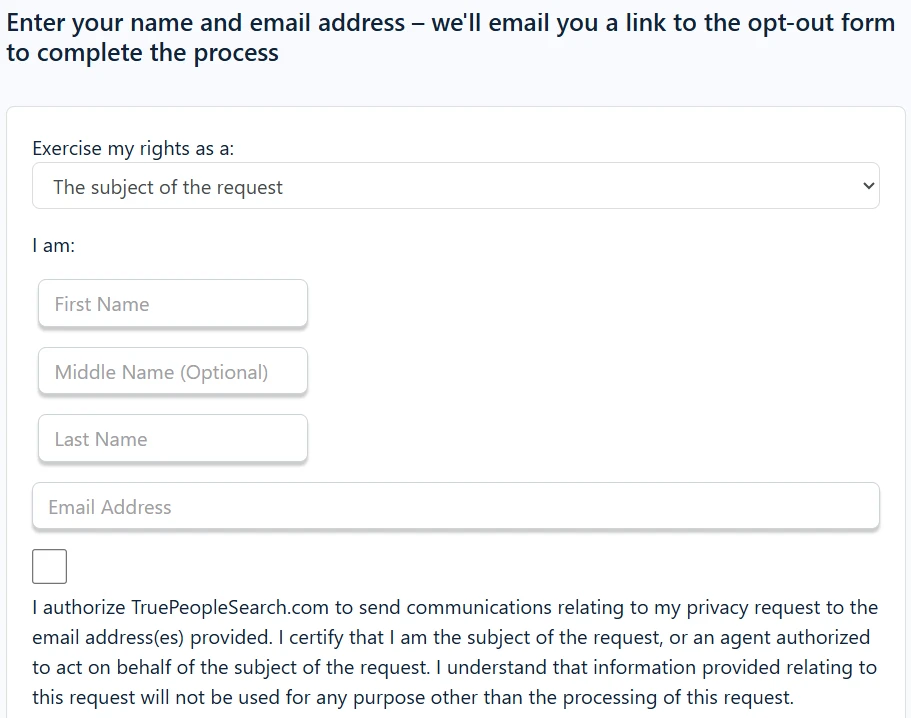
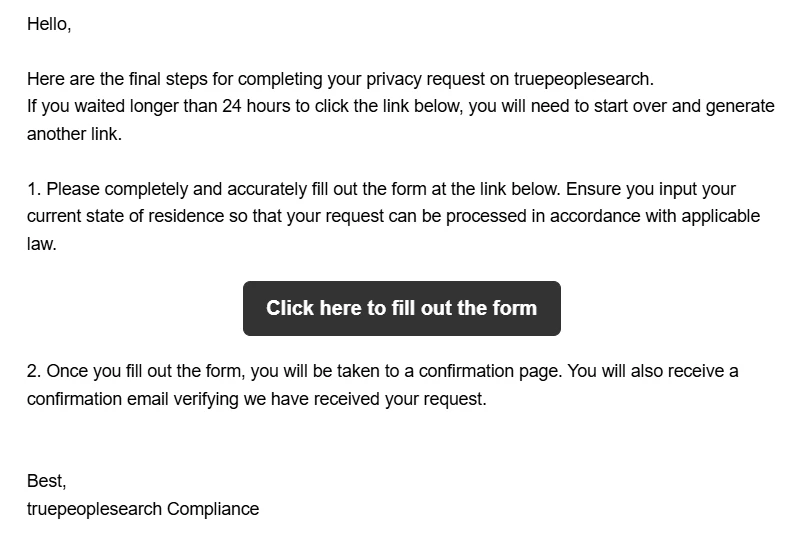
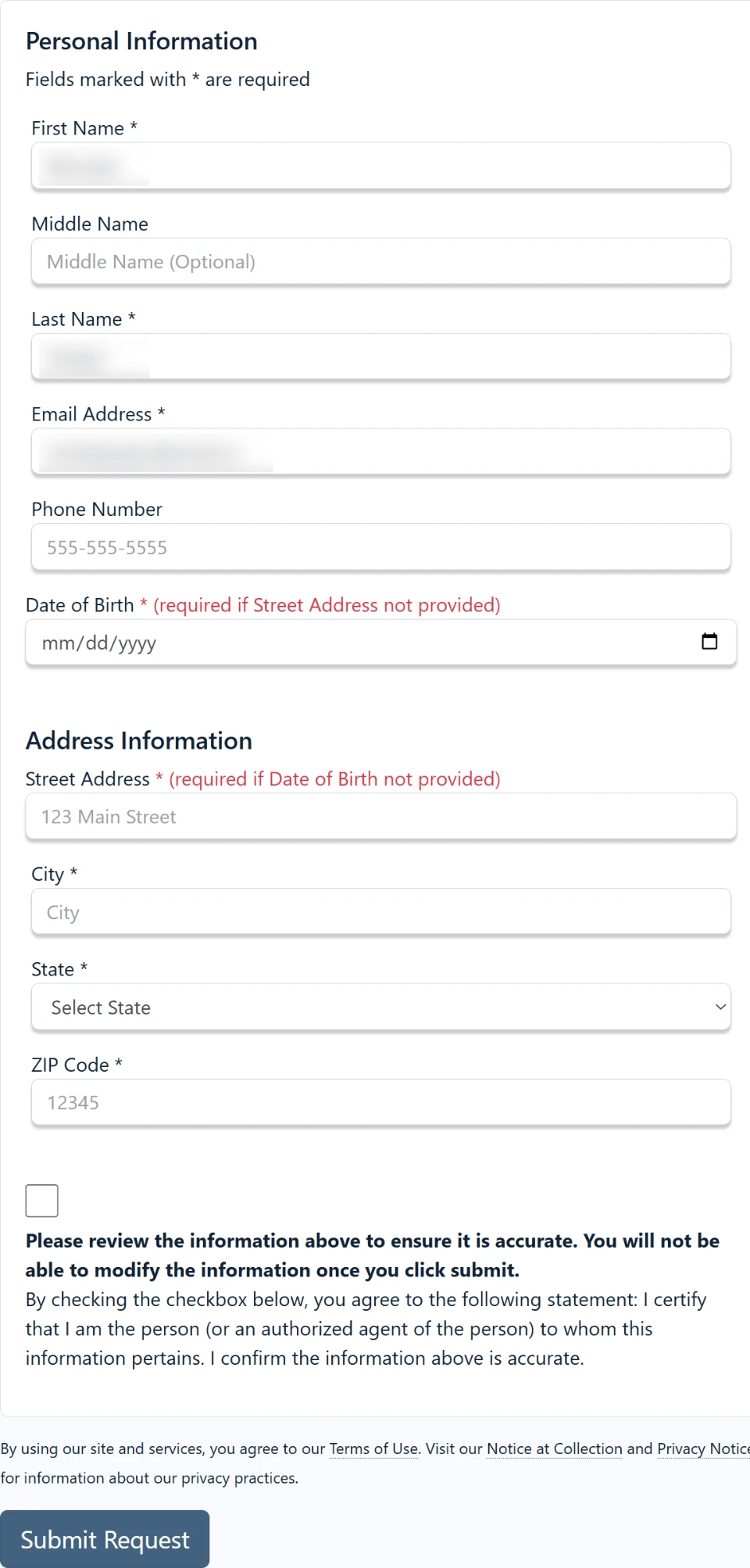
Same Steps on FastPeopleSearch, SearchPeopleFree, and USPhoneBook
Follow steps 1–6 above on each site's own opt-out page. The forms ask for the same details, the email link is valid for 24 hours, and each site says to allow 3 days for removal.
| Site | Opt-out page | Phone and email |
|---|---|---|
| TruePeopleSearch | truepeoplesearch.com/removal | 888-838-4803 [email protected] |
| FastPeopleSearch | fastpeoplesearch.com/optout | (866) 679-8725 [email protected] |
| SearchPeopleFree | searchpeoplefree.com/opt-out | (667) 217-6417 [email protected] |
| USPhoneBook | usphonebook.com/removal | 888-747-4095 [email protected] |
Removing yourself from one site doesn't remove you from the others. Search your name on each one first, and if you're listed, send a separate request. It takes a few minutes per site once you've done the first.
CyberBackgroundChecks works almost the same way. It publishes the same 2025 request figures as FastPeopleSearch, SearchPeopleFree, and USPhoneBook, and its opt-out uses the same 24-hour email link and 3-day removal. Its form is harder to find and asks for more, though: both your date of birth and your street address are required. See our CyberBackgroundChecks opt-out guide.
FamilyTreeNow uses the same steps too. It looks like a genealogy site and links to TruePeopleSearch from every page. Its opt-out has the same two forms, the same 24-hour email link, and the same 3-day removal, but it publishes its own figures: in 2025 it denied 42% of opt-out requests. See our FamilyTreeNow opt-out guide.
If Your Removal Is Denied
All four sites publish how many privacy requests they handled. For 2025, they report:
| Site | Opt-out requests | Opt-outs denied | Deletion requests denied |
|---|---|---|---|
| TruePeopleSearch | 155,567 | 51,840 (33%) | 168 of 168 |
| FastPeopleSearch, SearchPeopleFree, USPhoneBook* | 4,466,794 | 832,506 (19%) | 11,176 of 11,176 |
*All three sites publish identical figures, and so does CyberBackgroundChecks. The numbers cover requests from residents of all US states.
TruePeopleSearch says opt-outs were denied when "the data subject was determined to not be a covered consumer under an applicable consumer privacy law" or when it couldn't find the record. People who were turned down have posted the reply on the Better Business Bureau site: the person "lives in a state that does not have a comprehensive consumer privacy law that applies to our data." TruePeopleSearch's position is that public records aren't covered by state privacy laws at all, and that it applies opt-outs to them "as a courtesy."
FastPeopleSearch, SearchPeopleFree, and USPhoneBook give the same reasons and the same "courtesy" wording in their notices, so the advice below works for all four sites. Use the phone numbers and emails in the table above.
If that happens to you:
- Check whether your state has a privacy law. 19 states give residents the right to delete their data, with more joining in 2027 — see which US states give you the right to delete your data. Always enter the state you actually live in; the form asks you to certify that your details are accurate.
- Appeal. TruePeopleSearch's privacy notice says you can appeal through the Privacy Rights Page linked from its Privacy Notice or by calling 888-838-4803. In a reply to a BBB complaint, it asked the person to name the specific law they believe applies, so if your state has one, name it.
- Ask for the courtesy opt-out. If your state has no privacy law, write to
[email protected]and quote its own notice: it says that if you request an opt-out, it "will try to apply your request to the publicly available information we collect, as a courtesy." - Complain. A complaint with the Better Business Bureau and your state attorney general creates a public record. Some people report that TruePeopleSearch reversed a denial after a BBB complaint.
- Remove the Google result. Google's Results about you tool can remove search results that show your phone number, email, or home address, even if the listing itself stays on TruePeopleSearch.
What the TruePeopleSearch Opt-Out Doesn't Remove
- The original records. TruePeopleSearch says opting out "will not remove the data from its original source," so property, court, and other public records stay where they're published.
- Future records. It "regularly" receives new public records, and your information "may appear in our data products again in the future." TruePeopleSearch itself recommends refreshing your opt-out periodically.
- Other people-search sites. Your information "may still appear on other websites," TruePeopleSearch says. FastPeopleSearch, SearchPeopleFree, and USPhoneBook need their own requests — same steps, different address. See also the Spokeo, Whitepages, and BeenVerified guides.
- Search engine copies. Google takes time to refresh its index. TruePeopleSearch's help center points to Google's Remove Outdated Content tool for old results.
- Tracking on the site. The opt-out is about your record, not about cookies. To stop TruePeopleSearch's advertising partners from tracking your visits, use its Cookie Management link or turn on Global Privacy Control in your browser.
If Something Goes Wrong
| Problem | What to Do |
|---|---|
| The page is stuck on "Verify you are human" or says you're blocked | TruePeopleSearch runs Cloudflare bot checks. Turn off your VPN or switch to a US server, allow cookies for the site, or try another browser. |
| No email after you click Send Request | Wait a few minutes and check your spam folder. If it still isn't there, go back to the removal page and send the request again, checking the spelling of your email. |
| The email link doesn't work | It expires after 24 hours. Start over at truepeoplesearch.com/removal. |
| You made a mistake on the form | You can't edit a submitted request. Start a new one with the correct details. |
| Your record is still there after 3 days | Send a new request with your other details: an older street address, or your date of birth if you used an address. If that fails, call 888-838-4803 or email [email protected]. |
| Your request was denied | See If Your Removal Is Denied for how to appeal. |
Your Other Privacy Rights With TruePeopleSearch
- Know, delete, or correct. Residents of states with a privacy law can make these requests through the Privacy Rights Page linked from the Privacy Notice or by calling 888-838-4803. TruePeopleSearch verifies you by matching two or three details you give it, such as name, email, and phone number. Opt-out requests don't need this verification. Note that all 168 deletion requests it received in 2025 were denied; for removing your listing, the opt-out form above is the route that works.
- Authorized agents. Someone else can make a request for you. TruePeopleSearch may ask them for a signed authorization from you and may ask you to verify your identity directly.
- Texas. TruePeopleSearch says it's a data broker registered under Texas law.
Contact: [email protected], 888-838-4803, or by mail at PO Box 7775 PMB 29296, San Francisco, CA 94120-7775.
Live in California? The state's free DROP platform sends one deletion request to every registered data broker at once. Do it in addition to the TruePeopleSearch opt-out, not instead of it.
After TruePeopleSearch: Where to Opt Out Next
TruePeopleSearch is only one site. If you want your address off the first page of Google, these are the next ones to tackle:
- FastPeopleSearch, SearchPeopleFree, and USPhoneBook — same steps as above, up to 3 days
- Spokeo — email link, 24–48 hours
- ThatsThem — one form, no verification link, typically 72 hours
- Whitepages — phone call, up to 72 hours
- BeenVerified — email link, about 24 hours
- Nuwber — email link, up to 48 hours
- MyLife — email code, median 5 days
- PeopleConnect Suppression Center — one request covers Intelius, Instant Checkmate, TruthFinder, and US Search
- PeopleFinders — email link, up to 3 days
- CyberBackgroundChecks — email link, up to 3 days
- FamilyTreeNow — same steps as TruePeopleSearch, up to 3 days
To see what your IP address and internet provider already reveal, run the free Data Broker Exposure Report. It's also worth checking whether your email has shown up in a data breach — breached data is another common source for people-search profiles.
Don't Want to Repeat This Every Few Months?
The free form works, but TruePeopleSearch isn't the only site, and new public records can bring your listing back. Paid removal services check people-search sites for you and keep re-submitting opt-outs. If that's worth it to you, see the comparison of Optery, Incogni, and DeleteMe — what each one covers and what it costs.