
How to Opt Out of MyLife (2026)
Remove your MyLife profile for free with one form and an email code — no account, no "claiming" needed
Updated
MyLife is a people-search site that builds a public "profile" for millions of adults in the US. Its pages can show your age, current and past addresses, phone numbers, relatives, and links to background reports, and they often rank near the top when someone Googles your name. MyLife says it gathers this from "government, social, and other sources, plus personal reviews written by others."
Removing your profile is free. You don't need to sign up, pay, or "claim" the profile, even if MyLife's pages suggest it. The removal form asks for your state, name, city, ZIP code, and birth year, and, unless you live in California, a code that MyLife emails you. Here's how to fill it in so MyLife finds the right profile on the first try.
MyLife Opt-Out at a Glance
Opt out ofMyLifeHow we checked this guide: On November 21, 2026, we opened MyLife's removal form from a US connection, went through every field, and verified an email address with the code MyLife sent, stopping before the final Submit button. Quotes come from the form itself, MyLife's Privacy Policy (last updated August 20, 2026), its California addendum (last modified April 9, 2026), and its Help page.
How to Remove Yourself From MyLife, Step by Step
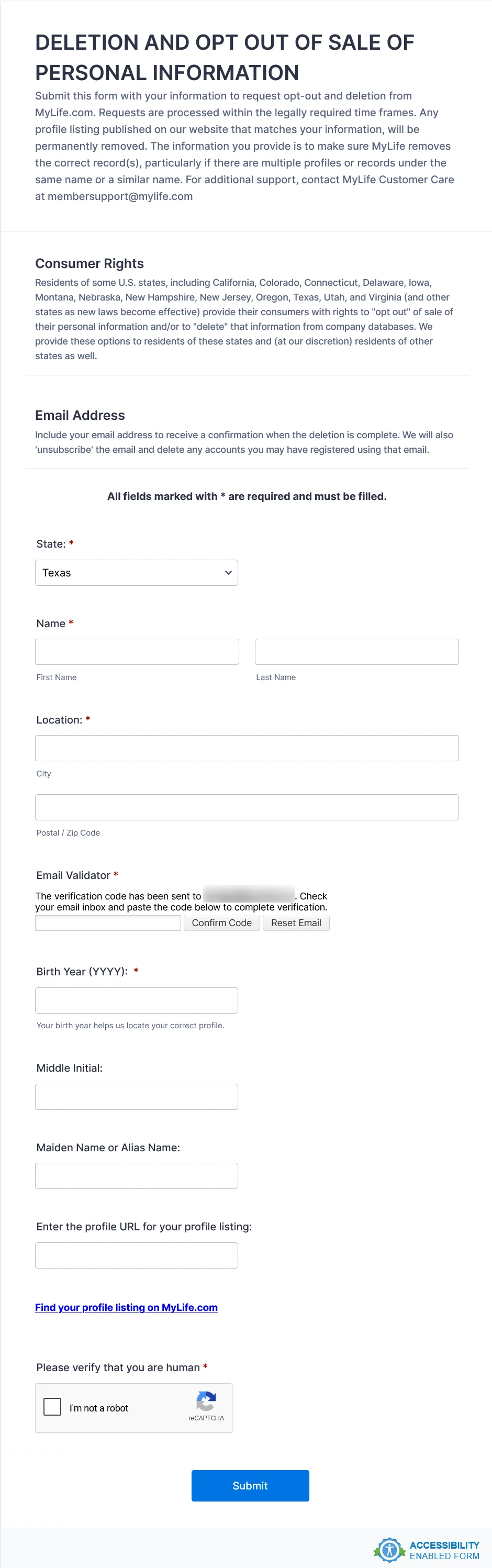
Don't "Claim" Your Profile to Remove It
MyLife invites you to "claim" or "take control of" your profile. That means registering as a member, free or paid, and it lets you edit what the profile shows. It does not remove it. MyLife's own Help page lists claiming and privacy requests as separate things, and the removal form says outright: "You do not need to create an account with us to exercise your opt-out rights."
Signing up also gives MyLife more information about you, such as a confirmed email address and, for paid plans, payment details. If you only want the profile gone, skip registration and use the form.
Who Can Opt Out
The form lists residents of "California, Colorado, Connecticut, Delaware, Iowa, Montana, Nebraska, New Hampshire, New Jersey, Oregon, Texas, Utah, and Virginia (and other states as new laws become effective)" as having a legal right to opt out or delete. MyLife adds that it provides these options "(at our discretion) residents of other states as well," and the state menu includes all 50 states.
In practice, MyLife reports turning down none of the requests it counted. For 2025, its California notice lists:
| Request type | Received | Denied | Median days to respond |
|---|---|---|---|
| Delete | 88,220 | 0 | 5 |
| Opt out of sale | 88,220 | 0 | 5 |
| Know (access) | 29 | 0 | Under 30 |
MyLife says these figures cover requests from California residents, and that it handles every deletion request as an opt-out too, and the other way around, which is why the two numbers match.
To see which states give you a legal right to deletion, read which US states give you the right to delete your data. Always select the state you actually live in.
What the MyLife Opt-Out Doesn't Remove
- Backup copies. MyLife's privacy policy says that after it removes a profile from public display, "some portions of the information contained in your profile may remain in our backup systems."
- The original records. MyLife collects data "and does not create it," so court, property, and other public records stay where they're published.
- Other people-search sites. Removing your MyLife profile doesn't touch Spokeo, Whitepages, BeenVerified, or the others. Each one needs its own request.
- Search engine copies. Google can show the old page for a while. Once your profile is gone, use Google's Remove Outdated Content tool to speed things up.
- Tracking on the site. The form removes your profile, not the ad cookies MyLife sets when you visit. To limit those, turn on Global Privacy Control in your browser.
If Something Goes Wrong
| Problem | What to Do |
|---|---|
| MyLife shows a Cloudflare check or says you're blocked | MyLife runs Cloudflare bot checks on its main site. Complete the check, allow cookies, or try another browser. If you use a VPN, switch to a US server or turn it off for a moment. |
| No verification code arrives | Wait a few minutes and check your spam folder for "MyLife.com - Please verify your email." If it isn't there, use Reset Email, check the spelling, and click Verify Email again. |
| The code doesn't work | Each code works once and expires after 24 hours. Request a new one. |
| You can't find your profile on MyLife | Leave the profile URL field empty and submit anyway. MyLife matches profiles using your name, city, ZIP code, and birth year. |
| Your profile is still there after 15 business days | Send a new request with an older city and ZIP code or another version of your name, and paste the profile URL. If that fails, email [email protected] with the profile URL and the date of your first request. |
| MyLife refuses your request | Its privacy policy says it will explain why and that, depending on your state, you can appeal by email. MyLife says it answers appeals within 60 days. |
Your Other Privacy Rights With MyLife
- See what MyLife has on you. Residents of states with privacy laws can use the Access Request Form. MyLife says it takes up to 30 days and needs an email address for delivery.
- Know, delete, or correct by email. You can also write to
[email protected]. MyLife says it responds within 45 days, which it can extend once by another 45, and it may ask you to confirm your email address or provide identification. - Authorized agents. Someone else can submit a request for you with written permission signed by you, or a power of attorney.
- Stop marketing emails. Use the unsubscribe link or contact Customer Care. MyLife says it can take 7 to 10 days.
Contact: [email protected], [email protected], or by mail at InsightBridge LLC, Attn: Privacy, 907 Westwood Blvd. (#359), Los Angeles, CA 90024-2905. MyLife doesn't list a phone number for privacy requests.
Live in California? The state's free DROP platform sends one deletion request to every registered data broker at once. Do it in addition to the MyLife form, not instead of it.
MyLife and the FTC
In 2020, the Justice Department and the Federal Trade Commission sued MyLife.com and its CEO. The government said MyLife used teaser search results suggesting that people might have criminal or sex offender records to sell subscriptions, and made it hard to stop recurring charges. In 2021, the court found that MyLife had violated the FTC Act and other consumer protection rules, and the case ended with a $33.9 million judgment, a ban on automatic-renewal subscriptions, and a requirement to monitor compliance with the Fair Credit Reporting Act (Justice Department).
Today, MyLife's pages state that it "is NOT a Consumer Reporting Agency," which means its information can't legally be used for decisions about credit, jobs, or housing. If you see something false on your profile, removing it with the form above is faster than trying to get it corrected.
After MyLife: Where to Opt Out Next
MyLife is only one site. If you want your address off the first page of Google, these are the next ones to tackle:
- Spokeo — email link, 24–48 hours
- ThatsThem — one form, no verification link, typically 72 hours
- Whitepages — phone call, up to 72 hours
- BeenVerified — email link, about 24 hours
- TruePeopleSearch and FastPeopleSearch — email link, up to 3 days
- Nuwber — email link, up to 48 hours
- PeopleConnect Suppression Center — one request covers Intelius, Instant Checkmate, TruthFinder, and US Search
- PeopleFinders — email link, up to 3 days
- CyberBackgroundChecks — email link, up to 3 days
- FamilyTreeNow — same steps as TruePeopleSearch, up to 3 days
To see what your IP address and internet provider already reveal, run the free Data Broker Exposure Report. It's also worth checking whether your email has shown up in a data breach — breached data is another common source for people-search profiles.
Don't Want to Repeat This Every Few Months?
The free form works, but MyLife isn't the only site, and new public records can create new profiles. Paid removal services check people-search sites for you and keep re-submitting opt-outs. If that's worth it to you, see the comparison of Optery, Incogni, and DeleteMe — what each one covers and what it costs.