
How to Opt Out of PrivateRecords (2026)
Remove yourself from PrivateRecords.net for free — no account, no ID, one confirmation email
Updated
PrivateRecords.net is a people-search and background check site run by Private Records LLC of Orlando, Florida. It says it searches over 12 billion public records, and its reports can include court and arrest records, address history, relatives, contact information, marriage and divorce status, and social and dating profiles. The search is advertised as free, but before it shows any results it asks for a credit card for a $0.30 "identity validation" hold, and the site advertises $1 for the first full report.
Removing yourself is free, and it's one of the simpler opt-outs: you don't need to find your listing or copy its URL. There's one catch, though. The request page offers two options, and the one that's selected by default doesn't remove anything. Here's how to pick the right one and get it done.
PrivateRecords Opt-Out at a Glance
Opt out ofPrivateRecordsHow to Remove Yourself From PrivateRecords, Step by Step
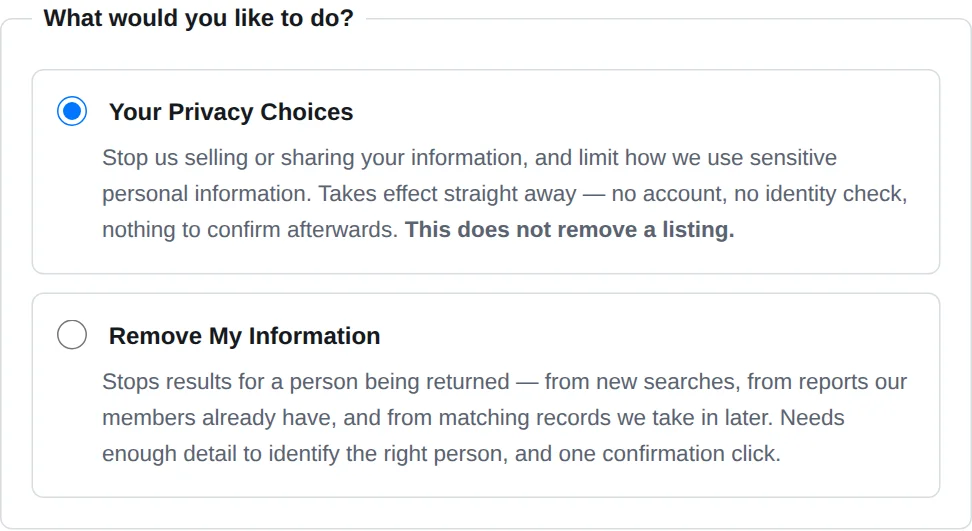
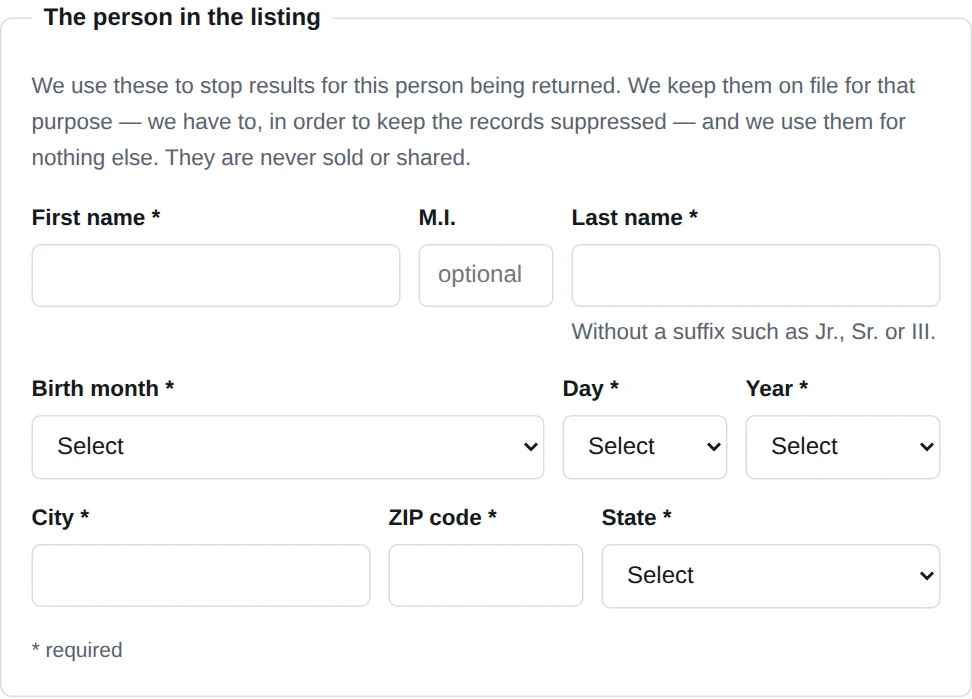
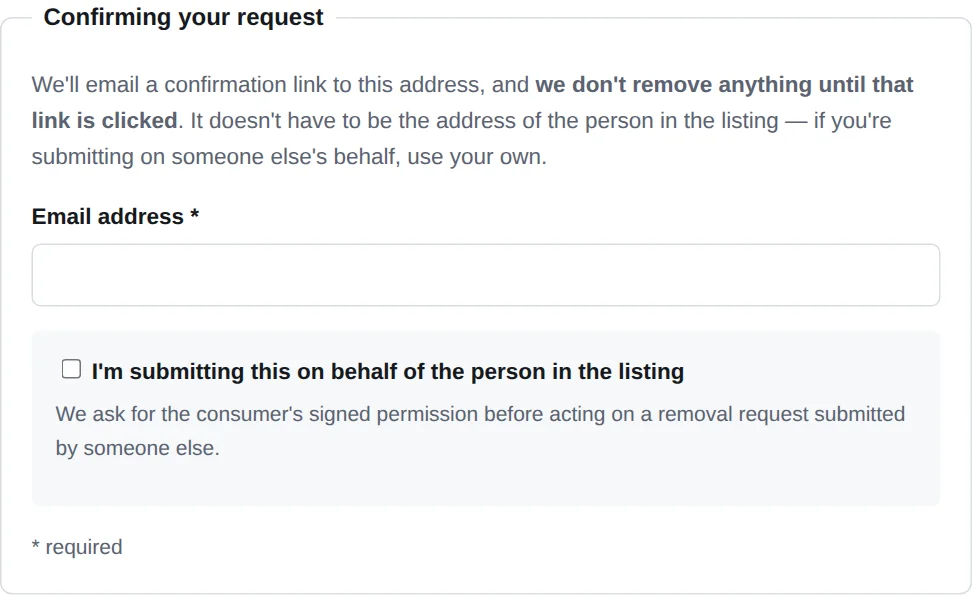
Using an older guide? PrivateRecords' privacy policy dates its current request page to October 15, 2026. Guides written before then may describe different steps. If what you see doesn't match, look for the "Remove My Information" option described above.
"Your Privacy Choices" vs. "Remove My Information"
Both options are on the same page, and they're easy to mix up. Here's what each one does:
| Your Privacy Choices | Remove My Information | |
|---|---|---|
| Removes your listing | No | Yes |
| What it does | Stops PrivateRecords from selling or sharing your information with advertising partners and referral affiliates, and limits its use of sensitive personal information | Stops results about you from being returned in searches and reports |
| What you enter | An email address or phone number (optional, so the choice also applies on your other devices) | Name, date of birth, city, ZIP, state, and email |
| Confirmation | None, takes effect right away | Email link |
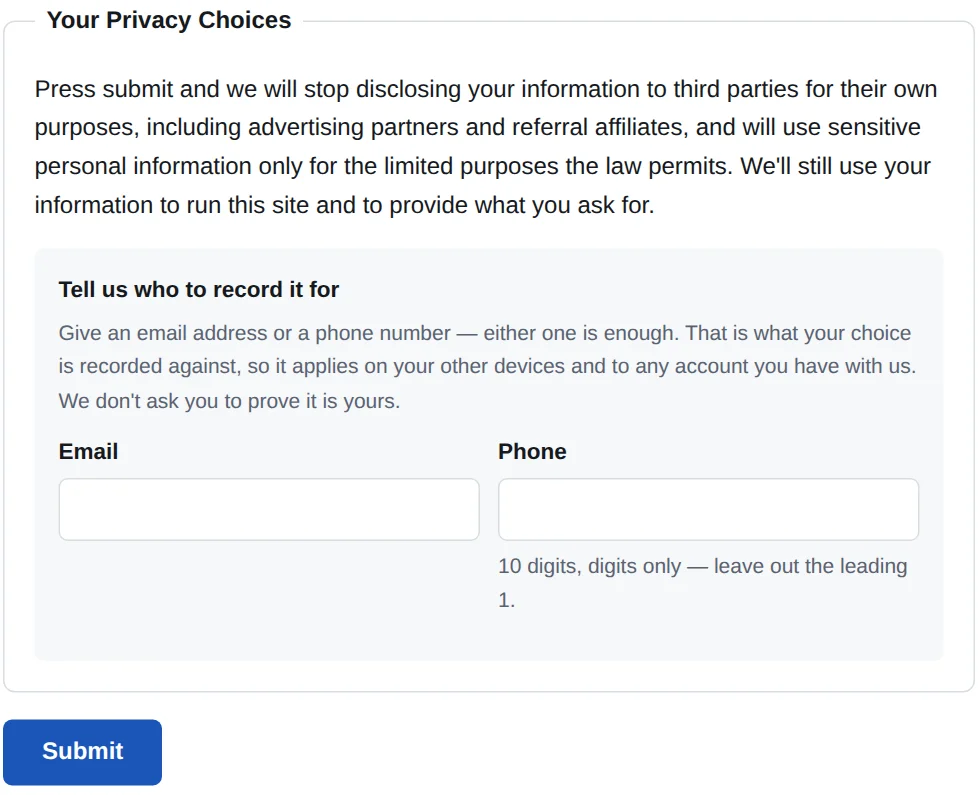
If you want both, submit the page twice, once with each option. If your browser sends a Global Privacy Control signal, PrivateRecords says it treats it as a "do not sell or share" request automatically. That covers Your Privacy Choices, but not removal.
If You've Moved or Changed Your Name
The removal form takes one name and one location per request. PrivateRecords doesn't say how far it matches beyond those details, so if you've been known by other names or lived in other cities, consider sending a separate request for each:
- Your name with and without a middle initial
- Maiden names and previous married names
- Cities and states where you lived before
New public records can create new results elsewhere, but PrivateRecords says a confirmed removal also covers matching records it takes in later, so you shouldn't have to repeat the request for the same name and location.
What the PrivateRecords Opt-Out Doesn't Remove
- Public records. Court, arrest, property, and other records stay with the government offices that publish them. The opt-out only stops PrivateRecords from showing them.
- Reports already downloaded. PrivateRecords says it can't recall a copy someone already downloaded.
- Other people-search sites. Spokeo, Whitepages, BeenVerified, and many others have their own copies. Start with the Spokeo opt-out and the Whitepages opt-out, then work through the full data broker opt-out guide.
- Search engine copies. Google can keep showing an old PrivateRecords page for a while. Once the result is gone from the site, you can speed things up with Google's Remove Outdated Content tool.
- Your paid account. If you pay for a PrivateRecords membership, cancel it separately. The site's Contact Us form has a "Cancel My Subscription" option.
If Something Goes Wrong
| Problem | What to Do |
|---|---|
| You only see "Tell us who to record it for" with email and phone fields | You're on Your Privacy Choices, which doesn't remove a listing. Select Remove My Information at the top of the page. |
| The ZIP code isn't accepted | Enter exactly five digits, without the ZIP+4 extension. |
| The confirmation email never arrives | Check your spam and promotions folders. If it isn't there, call (888) 270-9304 (daily, 8 a.m.–11 p.m. Eastern) and PrivateRecords says it will complete the request with you. |
| No word on your request after 45 days | Call (888) 270-9304 or email [email protected] with your name, city, and the date you submitted, and ask whether the removal is complete. |
| Your request was denied | Residents of California, Colorado, Connecticut, Delaware, Indiana, Iowa, Kentucky, Maryland, Minnesota, Montana, Nebraska, New Hampshire, New Jersey, Oregon, Rhode Island, Tennessee, Texas, Utah, and Virginia can appeal. PrivateRecords says it sends the appeal process separately with the denial. |
Your Other Privacy Rights With PrivateRecords
PrivateRecords' privacy policy lists a few more options:
- California's DROP platform. PrivateRecords says it processes deletion requests sent through the state's Delete Request and Opt-Out Platform on the schedule the Delete Act requires.
- Washington cell phone numbers. If you live in Washington and have a cell number with a Washington area code, you can call (888) 270-9304 to check whether the number is in PrivateRecords' data and have it removed. Tell the agent you're a Washington resident with a Washington cell number.
- Judges, police officers, and other covered persons. If a state law lets you limit what's shown about you, email PrivateRecords with the law that applies, proof that you're covered, a screenshot of your record on the site, and your full name, date of birth, city and state, phone number, and email.
- Authorized agents. Someone else can submit a removal for you on the same page or by phone, with your signed permission attached.
For calendar year 2025, PrivateRecords reports 7,178 deletion requests and 233,942 requests to opt out of sale or sharing from Californians, with a median response time of one day.
Live in California? The state's free DROP platform sends one deletion request to every registered data broker at once. Do it in addition to the PrivateRecords opt-out, not instead of it.
After PrivateRecords: Where to Opt Out Next
PrivateRecords is only one site. If you want your address off the first page of Google, these are the next ones to tackle:
- Spokeo — email link, 24–48 hours
- ThatsThem — one form, no verification link, typically 72 hours
- Whitepages — phone call, up to 72 hours
- InfoTracer — no verification, 24–48 hours
- Nuwber — email link, up to 48 hours
- MyLife — email code, median 5 days
- TruePeopleSearch and FastPeopleSearch — same email-link process, up to 3 days
- PeopleConnect Suppression Center — one request covers Intelius, Instant Checkmate, TruthFinder, and US Search
- BeenVerified — email link, about 24 hours
- PeopleFinders — email link, up to 3 days
- CyberBackgroundChecks — email link, up to 3 days
- FamilyTreeNow — same steps as TruePeopleSearch, up to 3 days
To see what your IP address and internet provider already reveal, run the free Data Broker Exposure Report. It's also worth checking whether your email has shown up in a data breach — breached data is another common source for people-search profiles.
Don't Want to Repeat This Every Few Months?
The free form works, but PrivateRecords isn't the only site, and new records can create new listings. Paid removal services check people-search sites for you and keep re-submitting opt-outs. If that's worth it to you, see the comparison of Optery, Incogni, and DeleteMe — what each one covers and what it costs.