
How to Opt Out of Social Catfish (2026)
Remove your Social Catfish listing for free with one form, no account or ID, and which of its three removal forms to use
Updated
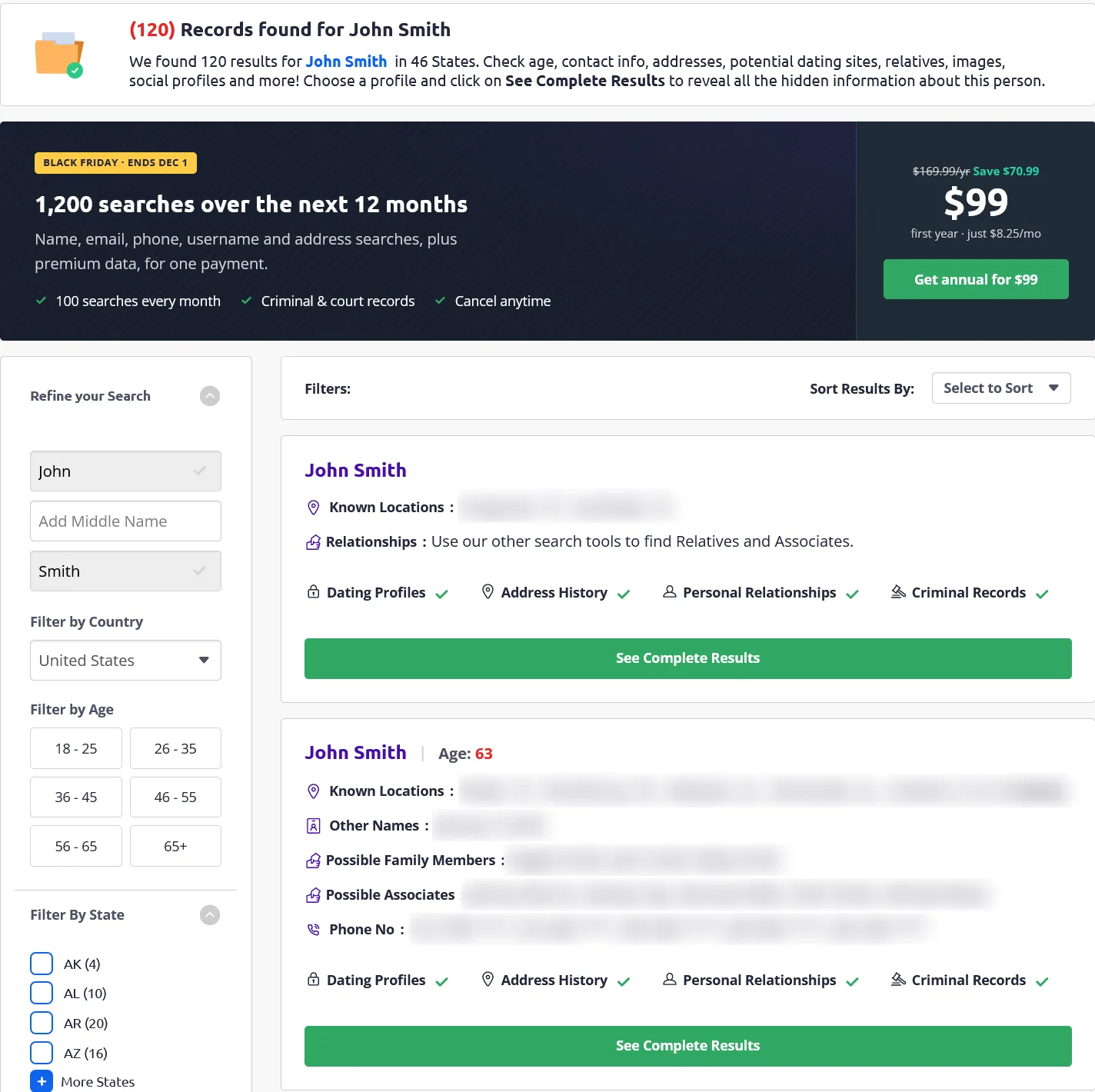
Social Catfish sells itself as a way to check whether someone you met on a dating app is real. Behind that is an ordinary people-search site. Search a name and every result shows the cities a person has lived in, other names, possible family members, associates, and partly hidden phone numbers. Searches by phone number, email, username, address, and photo work the same way. Its own privacy policy says that it's "considered a data broker under many U.S. laws."
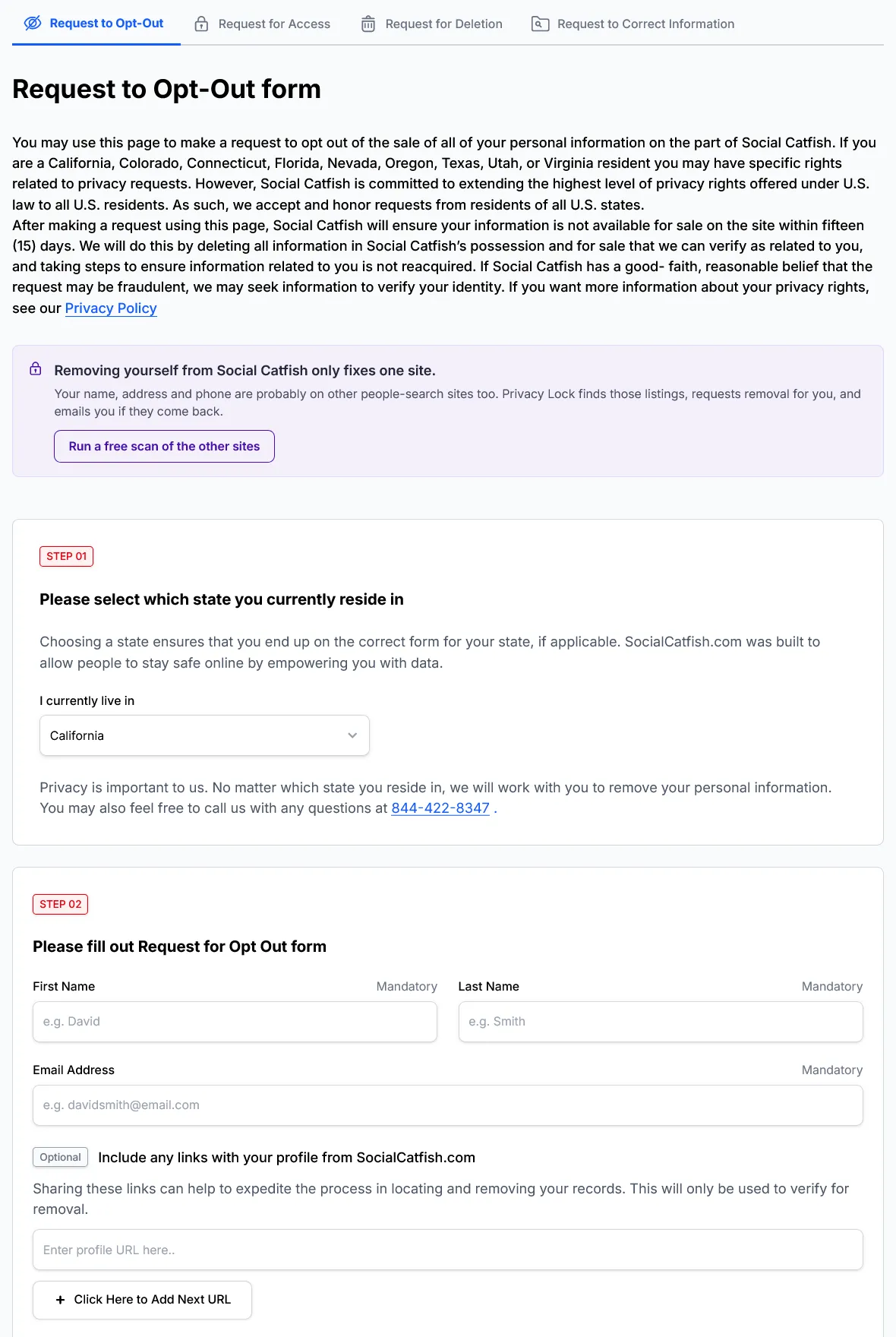
The opt-out is free and takes about five minutes. It works for residents of every US state, and Social Catfish promises to act within 15 days. The catch is that the site has three different removal forms and puts upsells on every page. In 2025, it also turned down 21% of opt-out requests from California residents. Here's which form to use and how to fill it in so it finds all of your listings.
Social Catfish Opt-Out at a Glance
Opt out ofSocial CatfishHow we checked this guide: On November 27, 2026, we went through Social Catfish from a US connection. We searched a name, opened a public profile, followed the paid report all the way to the checkout page, and filled in the opt-out and deletion forms, stopping before the Submit Now button. We didn't remove anyone's listing. Quotes come from those pages and from Social Catfish's Privacy Policy, which includes its California request figures for 2023 to 2025.
How to Remove Yourself From Social Catfish, Step by Step
socialcatfish.com/person/john-smith-59100115/. To find yours, search Google for site:socialcatfish.com/person "your name", or use the Directory link at the bottom of any page. Copy the address from your browser's address bar. The form doesn't require it, but Social Catfish says these links "help to expedite the process." The search-data.html?token=… page that opens after a search isn't a profile; don't use that one.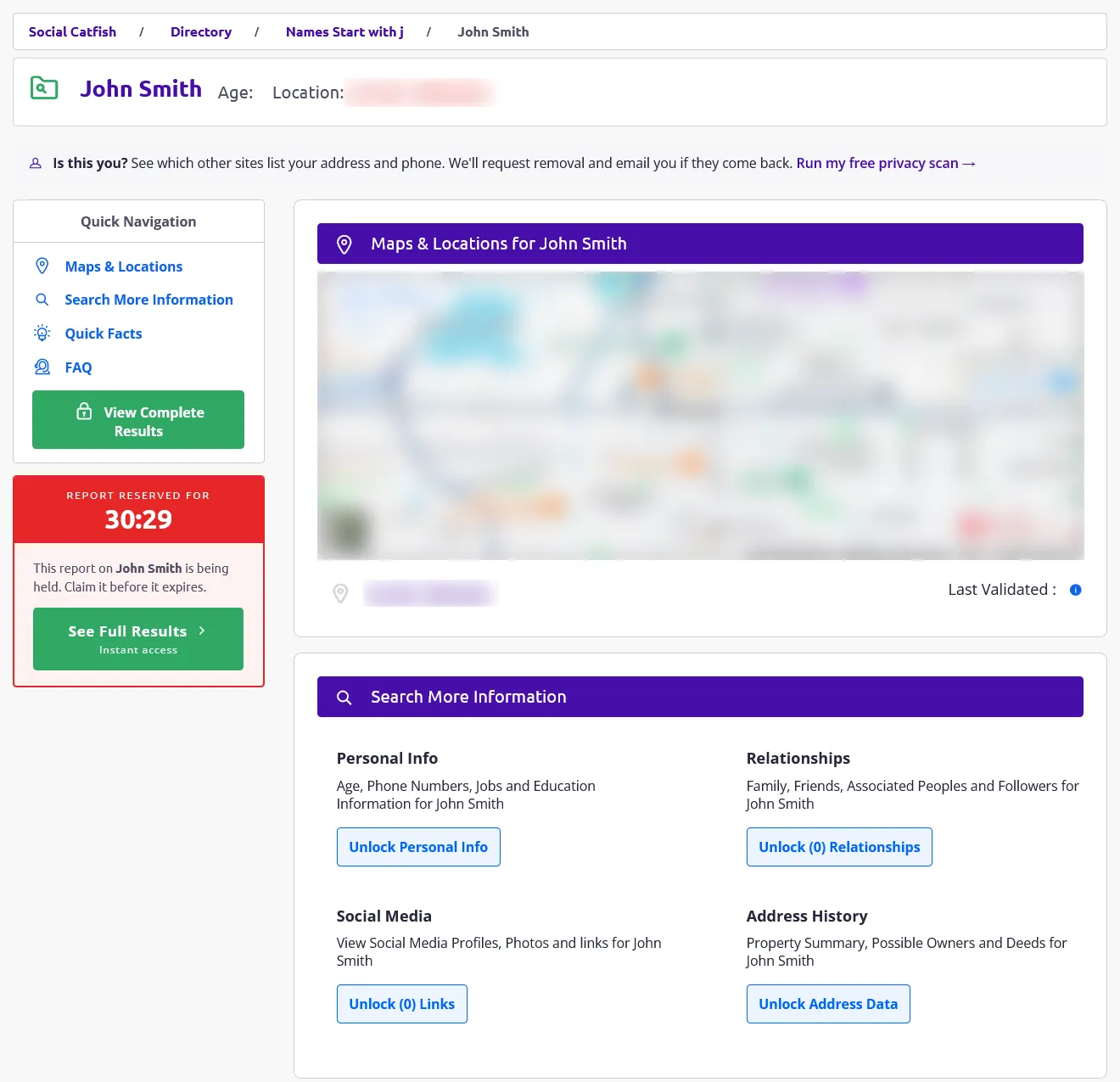
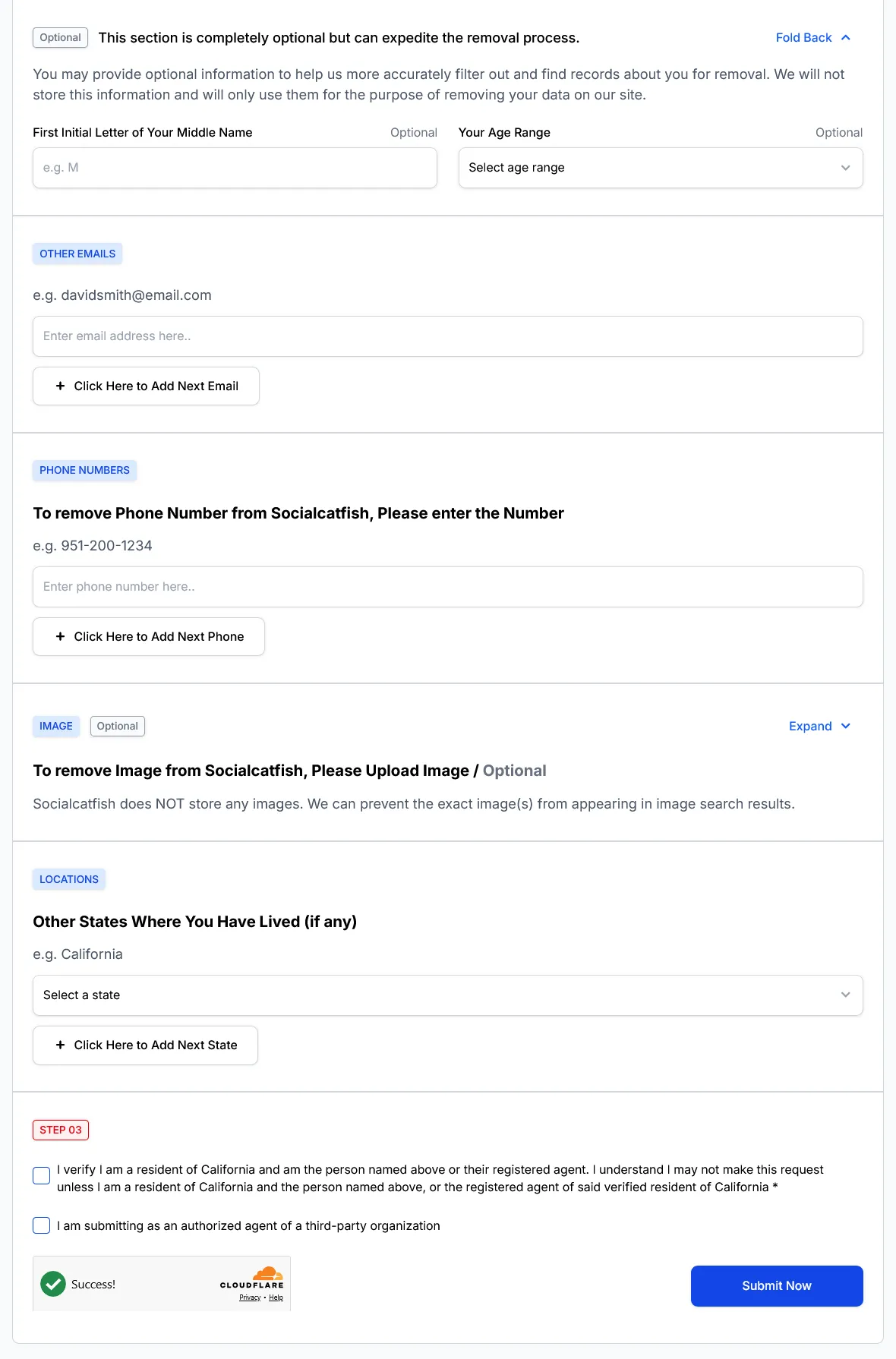
[email protected]. Social Catfish also says new records keep coming in, so check again every few months.Opt-Out, Deletion, or Law Enforcement: Which Form to Use
Social Catfish has more removal forms than most people-search sites, and they're easy to mix up:
| Form | Who it's for | Deadline | What's different |
|---|---|---|---|
| Request to Opt-Out | Anyone in the US | 15 days | Removes your listing from sale on the site. Social Catfish says it does this by deleting the information it can verify as yours. |
| Request for Deletion | Anyone in the US | Receipt confirmed in 10 days, answer within 45 days (can be extended by another 45) | Asks Social Catfish to delete everything it holds about you. Same fields, plus up to 8 photos or photo links, and a choice between "All specific information" and only some of it. |
| Opt-out Requests (Law enforcement) | Police officers and removal companies acting for them | Not stated | Removes specific profile URLs, emails, and phone numbers. Asks for a government email address. |
For most people, the Request to Opt-Out is the one to send. It's faster, and it's enough to get you off the site. If you also want Social Catfish to erase what it keeps behind the scenes, open the Request for Deletion tab on the same page and send that too, with "All specific information related to me that Social Catfish has in its possession" checked. It takes another three minutes because the fields are the same.
Skip the "See Complete Results" Funnel
Searching Social Catfish is free, but almost every button after that leads to a payment page:
- "See Complete Results." Clicking it on a search result starts a series of progress screens: "Searching Dating Sites," "Searching Dating Apps," "Searching Chat Apps," and "Searching Social Media," each promising things like "Forgotten Pictures," "Revealing Videos," and "Casual Friends Or Exes." A warning says the report "could contain links to websites that display shocking results like uncensored images or lewd content." Then it asks for your email to "securely send your report," with "Includes full report + Active monitoring. Cancel anytime" under the button.
- A recurring membership, not a one-time report. The checkout we reached offered a 3-month membership for $71.00, billed every 3 months, preselected as "Most Popular," or $36.00 a month. In late November 2026, a Black Friday banner also offered an annual plan at $99 for the first year instead of $169.99. The billing terms say it renews "until you cancel your account," which you do by calling 1-844-422-8347 or emailing
[email protected]. - "Report reserved for 30:29." Profile pages show a red countdown saying the report "is being held. Claim it before it expires." It's a sales timer; nothing happens to your listing when it runs out.
- Privacy Lock. The opt-out form, the profile pages ("Is this you? … Run my free privacy scan"), and the menu all promote Privacy Lock, which scans other people-search sites, "requests removal for you, and emails you if they come back." The membership lists Privacy Lock as a feature. You don't need it to opt out of Social Catfish itself.
None of these is part of the opt-out, and the opt-out form never asks for payment. If you want a service that removes you from many sites at once, compare the options in our data broker removal services comparison first.
What Social Catfish Is and Where Its Data Comes From
- The company. Social Catfish, LLC is based in Murrieta, California. It describes itself as "an online dating investigation service" that verifies "the person that you've met online is really who they say they are." Its search pages carry the note "People Found on This Page are NOT Catfishers."
- A data broker by its own account. Its privacy policy says Social Catfish is "considered a data broker under many U.S. laws – including the Texas Data Broker Act," and that it "derives the majority of its revenue from these fraud detection services."
- Where the records come from. The privacy policy lists "third-party consumer data resellers and licensors" and "information collected from public websites." It also lists job history among the details it licenses and sells to people who search.
- Searches by photo. Besides names, you can search by phone number, email, username, address, and image, including a "Face Recognition Search." The privacy policy says uploaded images are "only used for the limited purpose of running a reverse image search" and "are not sold in any way or disclosed to any vendors."
- Not a background check. Social Catfish says it isn't a consumer reporting agency, so its results may not be used for decisions about credit, employment, insurance, or tenant screening.
If Your Request Is Denied
Social Catfish publishes the number of privacy requests it received from California residents. They show how quickly opt-outs have grown, and that about one in five is turned down:
| Request type (2025) | Received | Completed | Denied | Average reply time |
|---|---|---|---|---|
| Opt out (Do Not Sell) | 53,716 | 39,155 | 11,498 (21%) | 8.08 days |
| Delete | 8,805 | 6,151 | 1,962 (22%) | 9.28 days |
| Know (access) | 333 | 174 | 146 | 9.11 days |
Source: Social Catfish Privacy Policy, California Disclosures, section "Metrics," covering January 1 to December 31, 2025. Opt-out requests grew from 2,547 in 2023 to 16,762 in 2024 and 53,716 in 2025.
Social Catfish doesn't say why it denied requests. Its privacy policy says it can't act on a request "if we cannot verify your identity," that without an account it "may need additional information to verify your identity (e.g., a driver's license or passport)," and that it may deny an opt-out it believes is fraudulent, in which case it has to explain why. If you're turned down:
- Reply with the details it asks for. Answer the email from Social Catfish rather than starting over, and send only what it requests.
- Add your profile address. A request with the exact
/person/address, your phone numbers, and the states you've lived in is easier to match than a name alone. - Write to the privacy team. Email
[email protected]or call 844-422-8347. The opt-out page says, "No matter which state you reside in, we will work with you to remove your personal information." - Complain to your attorney general. The privacy policy says your state may give you the right to complain to your state's attorney general if you're unhappy with how Social Catfish handles your privacy rights.
- Remove the Google result. Google's Results about you tool can remove search results that show your phone number, email, or home address, even if the listing stays on Social Catfish.
What the Social Catfish Opt-Out Doesn't Remove
- Other people-search sites. As Social Catfish's own banner puts it, "Removing yourself from Social Catfish only fixes one site." Spokeo, Whitepages, TruePeopleSearch, and the others each need their own request.
- The original sources. Social Catfish says it "aggregates publicly available information from third party sources," so removing a listing "will not remove your information from its original source."
- New listings. Social Catfish says that "since we continually receive new and updated records," you should "regularly check SocialCatfish for additional listings that may appear." Searching your name every few months is enough.
- Search engine copies. Google and Bing can show the old profile page until they visit it again. Use Google's Remove Outdated Content or Bing's Content Removal tool.
- Tracking on the site. The opt-out covers your listing, not the data Social Catfish collects when you visit. Its privacy policy says it shares identifiers such as IP addresses and hashed emails with advertising partners, which may count as a "sale." You can opt out of that through its "Your Privacy Choices" page or with Global Privacy Control. It doesn't honor Do Not Track.
If Something Goes Wrong
| Problem | What to Do |
|---|---|
| The site shows "Access denied" or keeps checking your browser | Social Catfish runs Cloudflare. If you use a VPN, switch to a different US server or turn it off for a moment, and try a private window without extensions. |
| You can't find the opt-out form | Scroll to the bottom of any page and click "All Privacy Requests (OR,CO,NV,ETC)" under "Legal," then the "Request to Opt-Out" tab. |
| Submit Now doesn't work | Check the "I verify I am a resident of…" box in Step 03; it appears after you choose a state and is required. Wait for the Cloudflare check to show "Success!" |
| No email arrives | Check your spam folder. If nothing arrives within a few days, email [email protected] with the date of your request. |
| You're still listed after 15 days | Search again in a private window, then send a new request with your profile address, phone numbers, and every version of your name. |
| Your listing comes back months later | New records can create it again. Repeat the opt-out. |
Your Other Privacy Rights With Social Catfish
- See your data. Use the "Request for Access" tab on the same page or email
[email protected]. Social Catfish says it responds within 45 days and that you can make this request twice in 12 months. - Correct your data. Use the "Request to Correct Information" tab. For Oregon residents, the privacy policy says Social Catfish will "simply delete the inaccurate data" where it thinks the deletion won't hurt you.
- Remove your photo from image searches. In the optional section of the opt-out or deletion form, upload the photo. Social Catfish says it can "prevent the exact image(s) from appearing in image search results."
- Authorized agents. Someone else can file for you by checking the authorized agent box. The privacy policy says agents need "proof of a signed consumer authorization subject to verification from the consumer."
Live in California? The state's free DROP platform sends one deletion request to every registered data broker at once. Do it in addition to the Social Catfish form, not instead of it.
After Social Catfish: Where to Opt Out Next
Social Catfish is only one site. If you want your address off the first page of Google, these are the next ones to tackle:
| Site | Verification | Removal Time |
|---|---|---|
| Spokeo | Email link | 24–48 hours |
| Whitepages | Phone call | Up to 72 hours |
| TruePeopleSearch & FastPeopleSearch | Email link (valid 24 hours) | Up to 3 days |
| BeenVerified, PeopleSmart, PeopleLooker & NeighborWho | Email link | About 24 hours |
| Intelius, Instant Checkmate & TruthFinder | Email link + code to a phone or email in your report | Not stated |
| MyLife | Email code (none in California) | Median 5 days |
| PeopleFinders | Email link (valid 24 hours) | Up to 3 days |
| FamilyTreeNow | Email link (valid 24 hours) | Up to 3 days |
| CyberBackgroundChecks | Email link (valid 24 hours) | Up to 3 days |
| AdvancedBackgroundChecks | Email link (valid 24 hours) | Up to 45 days |
| ThatsThem | None (confirmation email) | Typically 72 hours |
| Nuwber | Email link | Up to 48 hours |
| InfoTracer | None (email confirmation optional) | 24–48 hours |
| PrivateRecords | Email link | Up to 45 days |
To see what your IP address and internet provider already reveal, run the free Data Broker Exposure Report. It's also worth checking whether your email has shown up in a data breach — breached data is another common source for people-search profiles.
Don't Want to Repeat This Every Few Months?
The free form works, but Social Catfish isn't the only site, and new records can bring your listing back. Paid removal services check people-search sites for you and keep re-submitting opt-outs. If that's worth it to you, see the comparison of Optery, Incogni, and DeleteMe — what each one covers and what it costs.